
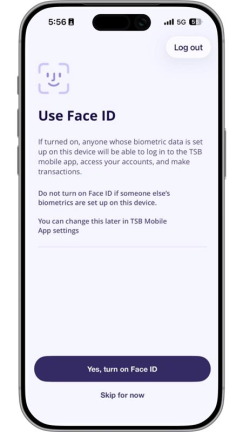
You can now use your biometric information - like your fingerprint or face - to log in to the TSB mobile app. It’s a quick and secure way to access your accounts, and another step we’re taking to help keep your banking safe.
How it works
If your device supports biometrics, and you’ve enabled it in your device settings, you can choose to turn this feature on in the TSB mobile app.
iOS users can use either Face ID or Touch ID, while Android users can use Fingerprint.
Before you can enable biometric login, you’ll need to:
1. Update to the latest version of the TSB mobile app
2. Follow the prompts and choose to enable biometric login
If you don’t have a registered New Zealand mobile number or physical token, you may need to contact us to receive a code to complete your device registration.
Note: Using biometrics is optional. You can continue logging in with your PIN if you prefer - and you can turn biometric login on or off in the TSB mobile app settings at any time.
Why use biometric login?
Logging in with your face or fingerprint is:
- Quick - there’s no need to enter your PIN every time
- Secure - your biometric features are unique to you
Your biometric information stays on your device. TSB doesn’t collect or store your fingerprint, face or other biometric data.
Keep your banking safe
Keeping your money and personal details safe is our top priority. To learn more about what we do and how you can protect yourself, visit our security hub.
Get started with the TSB mobile app
Our mobile app gives you an easy way to bank with us on your phone or tablet. Learn more about how you can get started.